
The Professional's Guide to Network Cable Color Coding: Copper vs. Fiber
In structured cabling, organization is just as important as performance. While category ratings (Cat5e, Cat6, Cat6A) determine speed and bandwidth, color choices for cables and keystone jacks serve an equally important role in day-to-day management.
For new professionals entering the industry, understanding how and why to use different colors can save time, reduce errors, and create a system that scales as networks grow.
Why Color-Coding Matters in Copper Cabling
In large or even medium-sized installations, hundreds of cables may be terminated into patch panels, wall plates, and equipment racks. Without a clear identification system, troubleshooting and upgrades become inefficient and error-prone.
Color-coding is not a technical requirement—the cable’s performance is identical regardless of jacket color—but it provides three major benefits:
- Clarity during installation: Technicians can route and terminate cables with minimal confusion.
- Efficiency in troubleshooting: Network issues can be isolated more quickly.
- Consistency for documentation: A color scheme reinforces logical diagrams and labeling practices.
Common Color Assignments in Professional Environments
There is no global industry standard for color use in copper cable. However, many IT teams adopt similar conventions that have become widely recognized in the field:
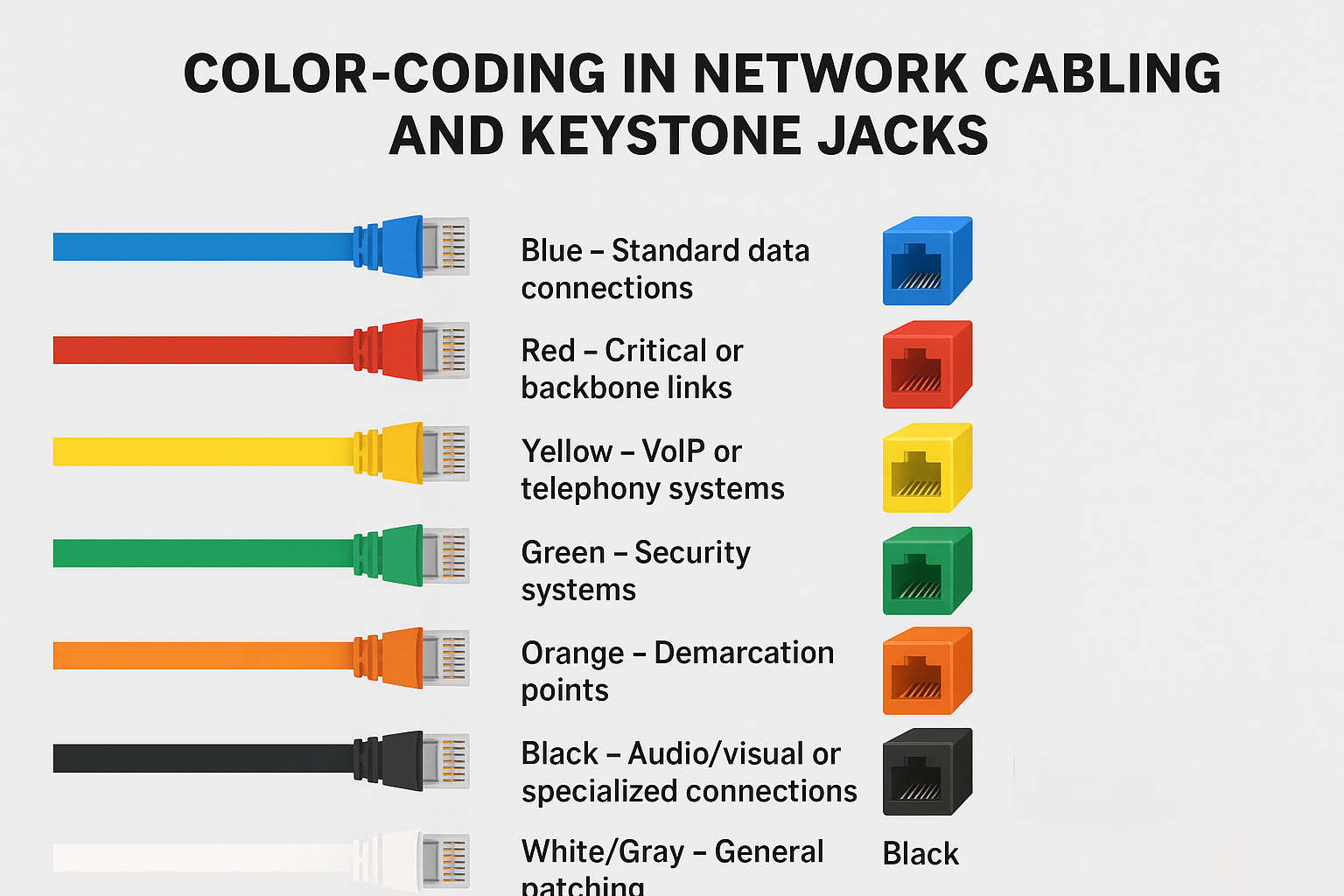
- Blue: Standard user data connections (workstations, printers, access points).
- Red: Critical or backbone links (servers, firewalls, core switches).
- Yellow: VoIP or telephony systems.
- Green: Security systems, such as IP cameras or access control.
- Orange: Demarcation points or cross-connects from ISPs/carriers.
- Black: Audio/visual or specialized connections.
- White/Gray: General patching or “default” connections.
Note: These practices are not enforced by ANSI/TIA standards. Each organization should define its own structured color policy and apply it consistently.
Keystone Jack Color Coding
Just as with cable jackets, keystone jacks are available in multiple colors. Many installers match the jack color to the cable jacket to preserve visual consistency from patch panel to wall plate. This ensures that a blue jack at a workstation clearly ties back to blue cabling in the rack.
In some environments, keystone colors are also used to differentiate service types at the faceplate level (e.g., Blue for Data, Yellow for Voice).
Best Practices for Copper Installation
- Establish a Standard: Work with your client or organization to define a cable/jack color chart that covers common services.
- Document Thoroughly: Record the scheme in diagrams, labeling, and network documentation. Future technicians will depend on it.
- Maintain Consistency: Once a system is in place, do not deviate from it on future expansions.
- Avoid Excessive Complexity: A handful of colors is usually sufficient. Too many variations can create confusion rather than clarity.
Fiber Optic Cable Colors: Where Color Really Matters
Unlike copper network cabling, where jacket color is mostly about organization, fiber optic cable colors are standardized and indicate the type of fiber inside. This is critical to ensure compatibility and performance in professional installations.
Common Fiber Jacket Colors & Meanings
Here’s a breakdown of the most common fiber optic cable jacket colors and what they represent:
- Orange (OM1 / OM2): Multimode fiber. Typically used for older multimode installations with lower bandwidth and shorter distances.
- Aqua (OM3 / OM4): Multimode fiber. Designed for higher bandwidth applications such as 10G, 40G, and 100G Ethernet.
- Violet or Lime Green (OM5): Multimode fiber. Optimized for wideband transmission and high-capacity data centers.
- Yellow (OS1 / OS2): Singlemode fiber. Used for long-distance, high-speed links—commonly between buildings, across campuses, or in backbone connections.
Why Fiber Standards Matter
Using the correct fiber type is essential. For example, multimode equipment won’t perform properly on singlemode cabling. Jacket colors help technicians instantly recognize what kind of fiber they’re working with, reducing costly hardware mistakes.
Best Practices for Fiber
- Match equipment to fiber type: Always verify whether your transceivers and patch panels support singlemode or multimode.
- Stay consistent with standards: Unlike copper, fiber colors aren’t just organizational—they’re functional identifiers.
- Label everything: Even with color-coded jackets, proper labeling ensures there’s no confusion, especially in mixed environments.
Conclusion
For copper, adopting a consistent color scheme makes installations cleaner and troubleshooting faster. For fiber, following jacket color standards ensures that technicians can immediately identify whether they are working with multimode (orange, aqua, lime green) or singlemode (yellow) cabling.
For professionals entering the networking field, mastering both copper and fiber color-coding is a hallmark of quality work. It ensures networks are organized, professional, and reliable.
Ready to organize your next project?
We carry a full range of copper and fiber optic cables—available in multiple colors—along with matching keystone jacks and fiber connectors, so your projects stay efficient and professional.
Call, shop online or visit us in-store at any of our three locations.